
Uncategorized
October 2, 20264 min read
What is the difference between website and web application?
In the digital age, terms like “website” and “web application” (or web app) are often ...
Read ArticleBy @mike
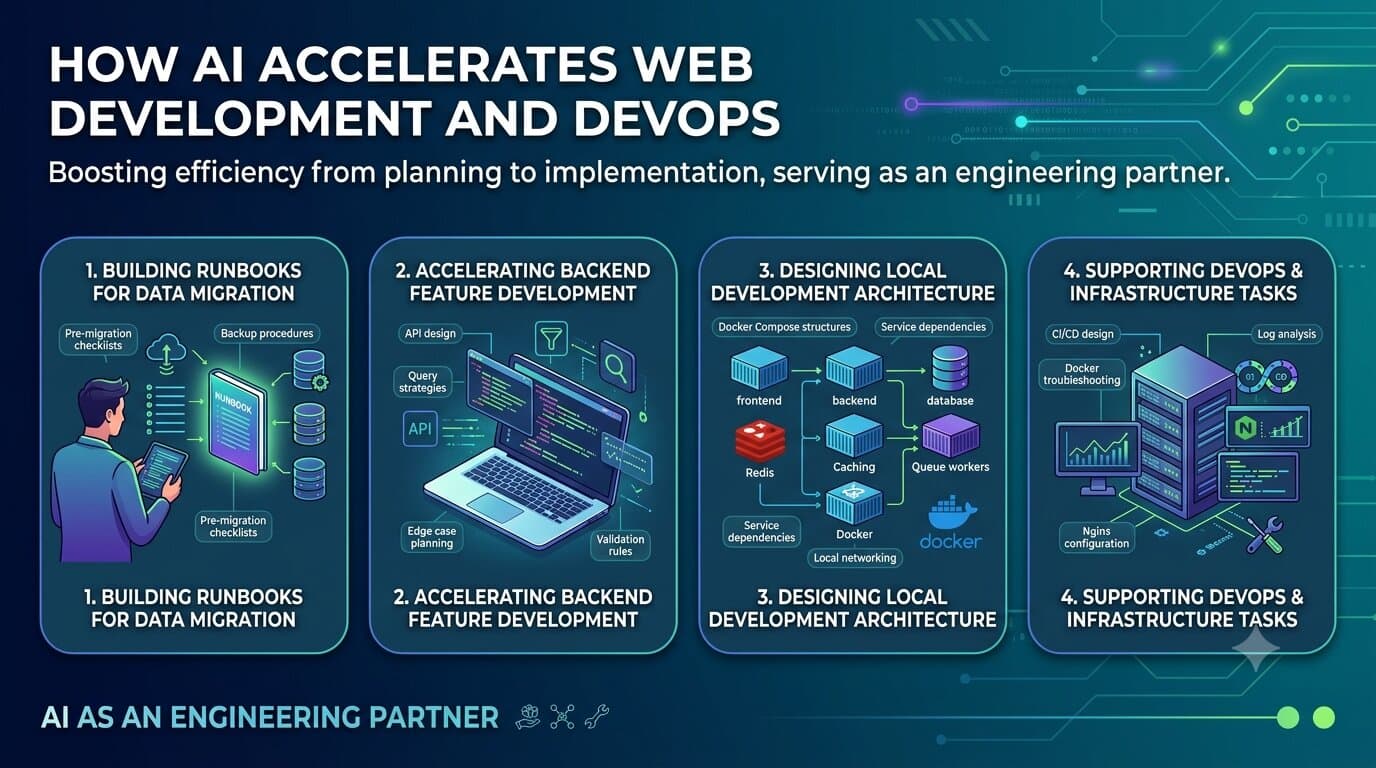
Over the past year, AI has become an essential part of my daily workflow as a web developer. Rather than treating AI as a tool for generating code snippets, I use it as an engineering assistant that helps me design systems, create documentation, automate repetitive tasks, and accelerate decision-making.
The biggest value I have gained is not writing code faster—it is reducing the time spent on planning, documentation, and implementation details so I can focus on solving business problems.
In this article, I want to share a few practical ways I use AI in my day-to-day work.
One of the most critical tasks in website maintenance is migrating data from a Staging environment to Production.
Traditionally, migration procedures often live in scattered documents, Slack conversations, or the knowledge of a few experienced developers. This creates risks during deployment because missing a single step can lead to downtime or data inconsistency.
Using AI, I can quickly create detailed migration runbooks that include:
Instead of spending hours writing documentation manually, I can generate a structured runbook within minutes and refine it based on project requirements.
The result is a more repeatable deployment process, reduced operational risk, and better knowledge sharing across the team.
AI has also significantly reduced the time required to implement backend features.
A common example is when discussing requirements with stakeholders for features such as:
Previously, a discussion session would often be followed by several hours of technical design and implementation planning.
Now, I can provide AI with:
The AI helps generate:
Tasks that previously required around 8 hours of planning and implementation can often be completed in approximately 1 hour because much of the boilerplate thinking and documentation is already prepared.
This allows me to spend more time reviewing architecture decisions and less time writing repetitive code.
Modern web applications often require a complex local development environment.
A typical project may involve:
When starting a new project, I frequently use AI to help design the development architecture.
For example, AI can assist with:
Rather than starting from a blank page, I can quickly generate an initial architecture proposal and then customize it to fit the project’s requirements.
This dramatically reduces setup time and helps maintain consistency across development environments.
Another area where AI provides tremendous value is DevOps.
Infrastructure work often requires remembering numerous commands, configuration formats, and deployment procedures.
I regularly use AI for tasks such as:
Instead of searching through documentation across multiple websites, I can describe the problem and receive a solution tailored to my environment.
AI also acts as a second reviewer by identifying potential issues before changes reach production.
The biggest misconception about AI is that it replaces developers.
In my experience, AI works best as an engineering partner.
It helps with:
The final decisions still require engineering judgment, domain knowledge, and experience.
What has changed is the speed at which I can move from an idea to a working solution.
For me, the real productivity gain is not generating code—it is reducing friction throughout the entire software development lifecycle.
As AI tools continue to improve, developers who learn how to collaborate effectively with AI will be able to spend less time on repetitive tasks and more time building valuable products.
Full-stack developer with 10+ years specializing in WordPress, high-traffic e-commerce, custom headless architectures, and AI agent integration.
Continue Reading
In the digital age, terms like “website” and “web application” (or web app) are often ...